Giving an AI agent access to my online bank

I have recently been trying to automate my company's monthly bookkeeping with agents. I find it tedious and procrastinate on it for far too long.
The biggest time sink is finding receipts from various services and one-off purchases, then attaching each one to the corresponding transaction in Holvi which I use as online bank.
I collect receipts in an iCloud Drive folder. A yet-to-be-released macOS app I've been building watches that folder, extracts receipt metadata with an LLM, renames the files, and adds the details as Finder comments. This gives an organized local archive, but I still need to match the filenames with transactions and upload them to Holvi.
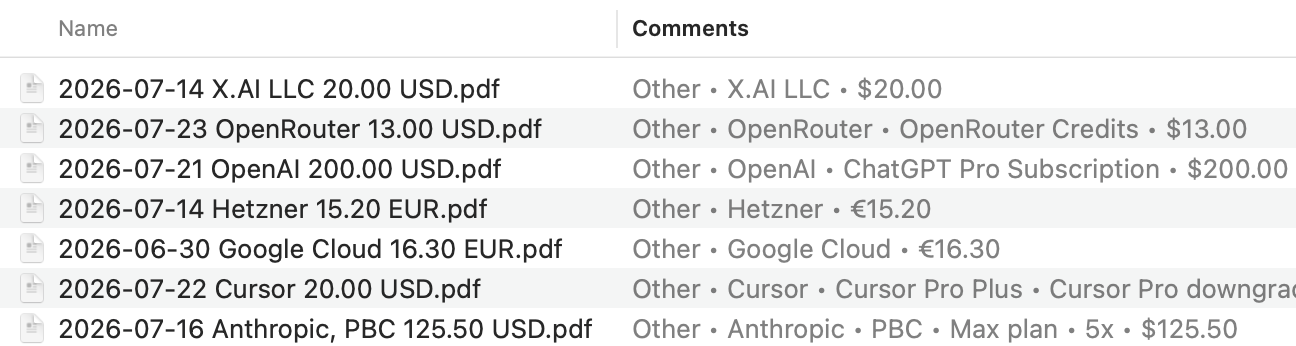
So as I've been using computer use more and more, and finding more practical uses for it, I started building a full end-to-end computer use workflow in Codex in hopes of automating this monthly bookkeeping duty. The agent can use the browser to find and download receipts from various services, inspect my local receipt archive, find Holvi transactions without attachments, match the receipts to them, and upload the right files.
In the first iteration, the agent used Holvi through the browser just as I would. It works, but at the same time gives broad access to the companys's online bank.
Holvi requires MFA for risky actions, which limits what can happen unattended. Still, handing a browser agent the same interface I use is a much larger access than the task requires. Attaching receipts and browsing transactions does not require the ability to navigate freely around the bank. Not to mention that it's terribly inefficient compared to the type of access an API would provide.
That led me to experiment with giving agents tightly scoped CLI access while keeping the authenticated session in the browser.
The result is Holvi Agent Bridge. Instead of navigating the website, the agent uses a native holvi CLI with named operations:
Uploading an attachment is also a specific operation:
I think the solution is surprisingly elegant. The bridge connects the CLI to a Chrome extension through a native messaging host. The extension gets authentication from a signed-in Holvi tab and makes the request. The Holvi session stays in the browser, and its token never reaches the CLI, terminal, or agent.
Of course, the CLI can only perform explicitly enabled operations, and the capabilities needed are toggled on as needed.
Personally, I think this pattern of letting an agent act on my behalf through a CLI, using a logged-in browser session, is quite interesting. I might expand it beyond Holvi later.
holvi-agent-bridge
Give your AI agent safe access to Holvi