Parsing and rendering tori.fi categories with Acorn, archy and Ramda
Tori.fi, a Finnish online marketplace based on blocket.se, has a category selection input that dynamically reveals sub-categories as user selects them.
It works like this:
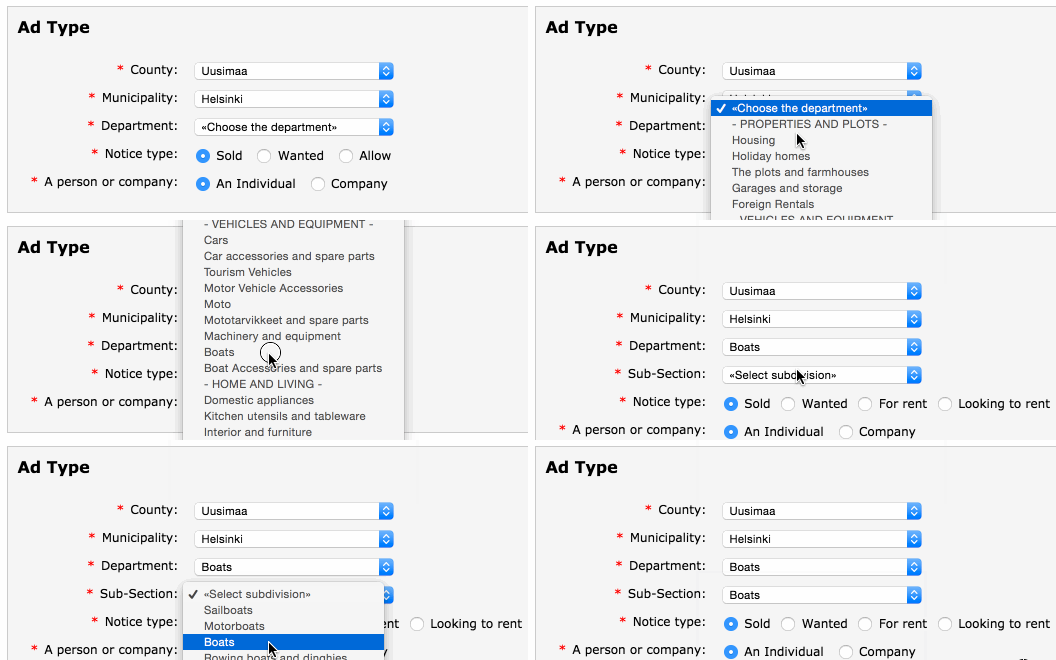
I was curious about the data structure beneath this widget and how it would look like if the categories were rendered into a tree-like format.
The source lies in the file arrays_v2.js [gist] and
contains all kinds of variables to localize and configure the site, including
the category_list object that is hooked up to the category selection. The
object follows a schema where the keys identify categories by their numeric ids,
and the values are metadata for their respective category, for example the
parent's id.
After a quick research, I found the tools to accomplish this task:
- Acorn, for parsing JS into an abstract syntax tree
- archy, a node library by substack for rendering nested hierachies
Also, we'll be using LiveScript and Ramda as base tools in this endeavor.
Now the problem could be split into two parts:
- Parsing the code with acorn and finding the
category_listnode in the AST output - Transforming the output into something that archy understands
Let's tackle the parsing problem first.
#Parsing
Parsing the file into AST with acorn is simple:
ast = acorn.parse fs.read-file-sync 'arrays_v2.js'
A bit more trouble is navigating the
massive AST output
acorn produces for this file. Luckily, in its dist/walk module acorn provides
a utility function called findNodeAt that we can use.
findNodeAt(node, start, end, test, base, state)
It takes a node, i.e. our ast from before, and a predicate function test
that determines if a node is of interest. The rest of the arguments can be used
for more elaborate searches but are not needed in this case.
Let's write a function find-category-list-props that takes an ast and
returns the properties of the category_list variable.
find-category-list-props = (ast) ->
    walk.find-node-at ast, null, null, is-category-list
    |> (.node.declarations.0.init.properties)
The predicate for matching the category_list variable is as follows:
is-category-list = (node-type, node) ->
    node.kind is \var and
    node.declarations?.0.id.name is \category_list
Essentially, it walks through the AST, looking for a variable definition with
the name category_list. Finally, it picks the first declaration of the var
and its properties.
The output is list of objects that looks like this:
Cool. We got the data, but as it is, it's not yet very easy to work with. Next, we'll come up with an operation that will transform above into something more manageable, a simple list of objects:
# :: Object → Object
prop-to-obj = -> (it.key.value): it.value.value

# :: [Object] → Object
props-to-obj = (R.map prop-to-obj) >> R.merge-all

# :: [Object] → [Object]
get-simple-props = map ->
    props = props-to-obj it.value.properties
    R.merge id: it.key.value, props
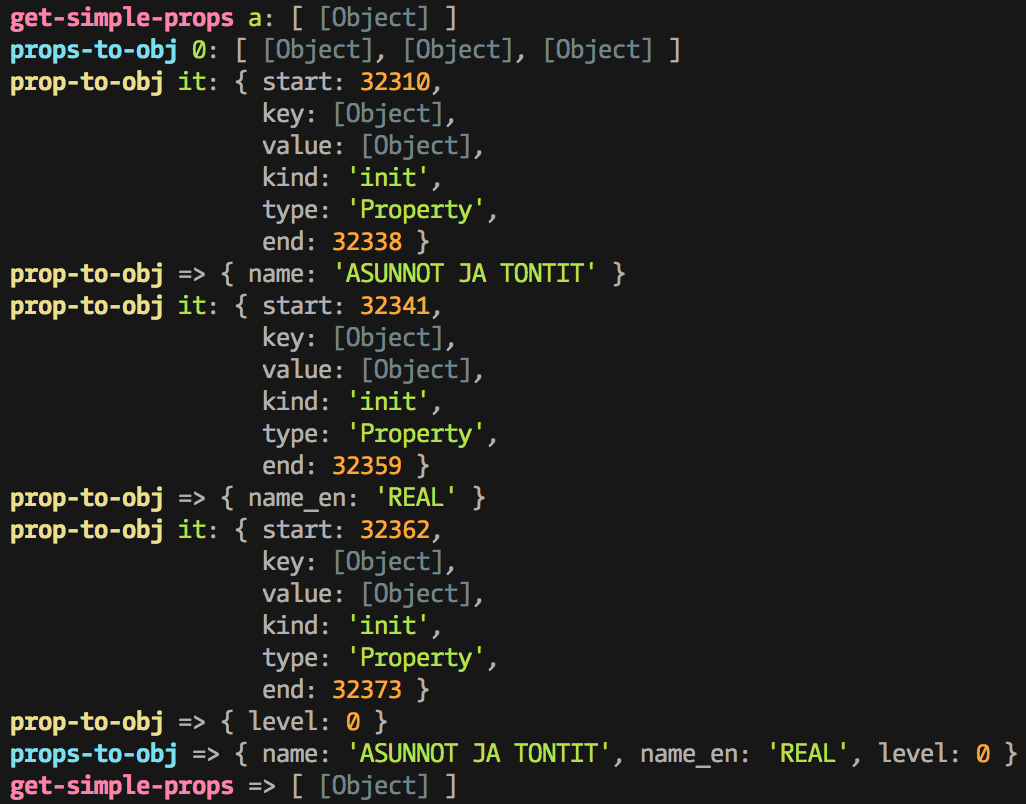
Using treis, we may illustrate what each of these functions does when
get-simple-props is given a single object in a list as input.
We are done with the first part of the problem. The set of operations we've
built can be expressed as parse function composed of all the steps:
# :: FilePath -> [Object]
parse = R.pipe do
    fs.read-file-sync
    acorn.parse
    find-category-list-props
    get-simple-props

render = ???
#Rendering
archy is a library for printing nested hierarchies with unicode
pipes. You might be familiar with this style of output from npm.
archy(obj, prefix='', opts={})
As input, archy takes a tree-like structure of
{ label: String, nodes: [Object] }
archy do
  label: \foo
  nodes: [
    label: \bar
    nodes: [
      label: \xyz
      nodes: []
    ]
  ]
foo
└─┬ bar
  └── xyz
We need something to make our flat list of objects a tree that adheres to
archy's API. The function will be called category-list-to-tree.
category-list-to-tree = (list) ->
    root = 'CATEGORIES'
    recurse-category = (cat) ->
        label: cat?.'name_en' or root
        nodes: R.map recurse-category, R.filter do
            R.where-eq do
                level  : cat?.level + 1 or 0
                parent : cat?.id or void
            , list
    recurse-category null
The function recursively builds a tree. The first call to recurse-category
with null as cat simply looks for root level (level: 0) categories without
a parent in the list. Next, for each of those we do the same operation and now
instead look for categories of the respective category's level incremented by 1
and its id as parent.
The output looks like:
Finally we can put all of the pieces together and run the data through archy and print it to stdout.
# :: FilePath -> [Object]
parse = R.pipe do
    fs.read-file-sync
    acorn.parse
    find-category-list-props
    get-simple-props

# note: >> is LiveScript syntax for R.pipe
render = category-list-to-tree >> archy

parse-and-render = parse >> render
parse-and-render 'arrays_v2.js'
|> console.log
#Output
CATEGORIES
├─┬ REAL
│ ├── Apartments & Houses
│ ├── Holidayhouses
│ ├── Land & agriculture
│ ├── Garage and storage room
│ └── Overseas apartments
├─┬ VEHICLES
│ ├── Cars
│ ├─┬ Car parts & accessories
│ │ ├── Autostereos & accessories
│ │ ├── Car spare parts
│ │ ├── Roof racks and boxes
│ │ ├── Trailers
│ │ ├── Tyres & bands
│ │ └── Other accessories
│ ├── Caravans
│ ├── Caravans accessories
│ ├─┬ Moto
│ │ ├── Motorcycles
│ │ ├── Mopeds/Vespas
│ │ ├── Motocars
│ │ ├── Snowmobiles
│ │ └── Fourwheels
│ ├─┬ Moto parts & accessories
│ │ ├── Suits, shoes and helmets
│ │ ├── Wheels
│ │ └── Other accesories & parts
│ ├─┬ Work machinery and equipment
│ │ ├── Transport equipment
│ │ ├── Machinery
│ │ ├── Woods and farming machines
│ │ ├── Excavation machinery
│ │ └── Other machinery
│ ├─┬ Boats
│ │ ├── Sailing boat
│ │ ├── Motor boat
│ │ ├── Rubber and Ribboat
│ │ ├── Jolle and rowingboat
│ │ ├── Kajak and canoe
│ │ ├── Waterscooter
│ │ └── Other water vehicles
│ └── Boatparts
├─┬ HOME & PERSONAL
│ ├─┬ Electric home appliances
│ │ ├── Dishwashers
│ │ ├── Fridges and freezers
│ │ ├── Ovens and microwaves
│ │ ├── Washing and drying machines
│ │ ├── Vacuum cleaners and cleaning
│ │ └── Other home appliances
│ ├── Kitchen accessories and dishes
│ ├─┬ Interior & furnitures
│ │ ├── Antique & art
│ │ ├── Shelves & keeping
│ │ ├── Carpets & textiles
│ │ ├── Tables & chairs
│ │ ├── Sofas & armchairs
│ │ ├── Beds & bedroom
│ │ ├── Lights
│ │ ├── Paintings
│ │ ├── Decoration
│ │ └── Other interior
│ ├─┬ Garden & yard
│ │ ├── Garden furniture & grills
│ │ ├── Lawn movers & machines
│ │ ├── Plants & seeds
│ │ ├── Pots, rocks & decorations
│ │ └── Other garden & yard
│ ├── Clothing & Shoes
│ ├─┬ Accessories and watches
│ │ ├── Clocks and jewelry
│ │ ├── Bags and hats
│ │ └── Other clothes
│ ├── Childrens clothes and shoes
│ ├─┬ Childrens accessories and toys
│ │ ├── Safety seats
│ │ ├── Children furniture
│ │ ├── Baby carriage
│ │ ├── Toys and games
│ │ ├── Children accessories
│ │ └── Others
│ └─┬ Constructing and renovations
│   ├── Bathroom, WC and sauna
│   ├── Electronics
│   ├── Tools, ladders and equipments
│   ├── Heaters and fireplaces
│   ├── Kitchen
│   ├── Insulation and roofs
│   ├── HVAC and pipes
│   ├── Windows, doors and floors
│   └── Other constructing and renovations
├─┬ SPORT & HOBBY
│ ├─┬ Sports
│ │ ├── Ice hockey and skating
│ │ ├── Skiing and snowboarding
│ │ ├── Soccer
│ │ ├── Rollerskating and skateboarding
│ │ ├── Martial arts
│ │ ├── Swimming and diving
│ │ ├── Running and jogging
│ │ ├── Golf
│ │ ├── Gym & Fitness
│ │ ├── Ball games
│ │ ├── Outdoors & Camping
│ │ └── Other sports
│ ├─┬ Biking and accessories
│ │ ├── Racer Bikes
│ │ ├── Mountain bikes
│ │ ├── Childrens bikes
│ │ ├── Other bikes
│ │ └── Bike accessories and helmets
│ ├─┬ Music and instruments
│ │ ├── Guitars, basses and amplifiers
│ │ ├── Pianos, organs and keyboards
│ │ ├── Drums
│ │ ├── Music CD, DVD and records
│ │ └── Other music and instruments
│ ├── Hunting
│ ├── Fishing
│ ├── Films
│ ├─┬ Books and magazines
│ │ ├── Hobby books
│ │ ├── Written books
│ │ ├── Childrens books
│ │ ├── Comics
│ │ ├── Studying books
│ │ ├── Magazines
│ │ └── Other books
│ ├─┬ Pets
│ │ ├── Cats
│ │ ├── Dogs
│ │ ├── Fish and aquariums
│ │ ├── Rodents
│ │ ├── Other animals
│ │ ├── Cats and dogs accessories
│ │ └── Animal parts
│ ├─┬ Horses and horsesports
│ │ ├── Saddles and accessories
│ │ ├── Horses and ponies
│ │ ├── Trailers and transports
│ │ └── Other utilities and accessories
│ ├── Travel and Tickets
│ ├─┬ Collecting
│ │ ├── Tableware
│ │ ├── Coins and medals
│ │ └── Other collecting
│ ├── Handiwork
│ ├─┬ Photography
│ │ ├── Cameras
│ │ ├── Lenses
│ │ ├── Photographing accessories
│ │ └── Other photography
│ └── Other sports and hobbies
├─┬ ELECTRONICS
│ ├── Phones
│ ├─┬ TV/Audio/Video/Cameras
│ │ ├── Television
│ │ ├── Digiboxes
│ │ ├── Audio and musicplayers
│ │ ├── Hometheathers, and DVD devices
│ │ ├── Consoles and playing
│ │ └── Other consumer electronics
│ └─┬ Computers & accessories
│   ├── Tablets
│   ├── Laptop
│   ├── Desktop computers
│   ├── Computer accessories
│   ├── Components
│   ├── Networks components
│   ├── Computer programs
│   └── Other computers & accessoriers
├─┬ BUSINESS & JOBS
│ ├── Jobs available
│ ├── CV
│ ├── Services
│ ├── Farming
│ ├── Construction services
│ └── Companies & shops
└─┬ OTHERS
  └── Others
I've shared the code on GitHub at
raine/parse-tori-categories.